SavvyRenter.co.ukFree tools for renters — nothing you type is stored or sent anywhereNothing is stored or sent
Redact your bank statements
Black out what nobody else needs to see, before you hand a statement over
A statement proves what you paid. It also carries your account number, your sort code, and every other payment you have ever made — none of which a landlord, an agent or an opponent is entitled to see. This blacks them out properly: the marks are burned into the picture, so there is nothing underneath to copy out again.
Your file never leaves this computer. Nothing is uploaded and nothing is stored; close the page and it is gone.
1 · The pagePage No file open. A PDF, or a photo or scan of a page.
2 · Black it out
3 · Rules & saving
Every word the reader could still pick out of the finished page — what anyone you send it to could read. Stray letters such as “IEEE” or “|]” are the reader trying to read a black box, not text from under it. Want a second opinion? Check it independently.
Every line is outlined. Click the last word you want to KEEP — everything after it goes black and the amount goes with it; the balance never does. On the account-number line each word is its own box, and a long number keeps its last four. Click a black box to lift it, or drag across anything missed. A rule made here stays while this page is open: open the next statement page and press Apply rules. Refreshing the browser clears them — Save rules keeps them in a file.
Nothing to hand? Try it on these made-up statements first:
sample 1,
sample 2,
sample 3.
They are from a bank that does not exist and are marked as samples, so you can find your way around without putting anything of yours at risk.
Before you send it. Open the saved file and read it as if you were the other side. The black boxes are part of the picture, so nothing can be selected or copied from underneath — but only what you covered is covered. Check the top of the page, the running balance, and any other payment that has nothing to do with the dispute.
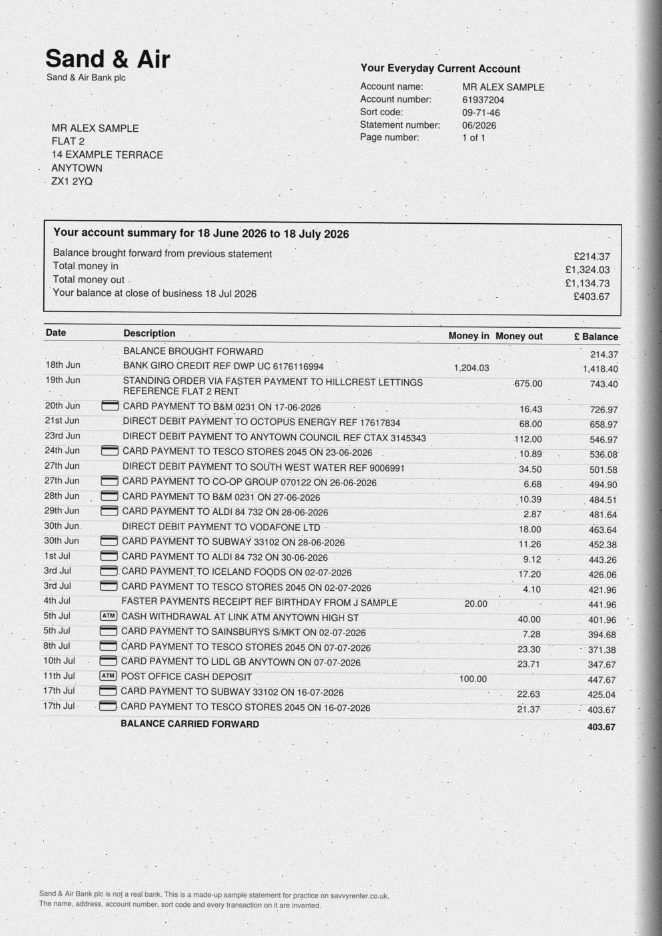
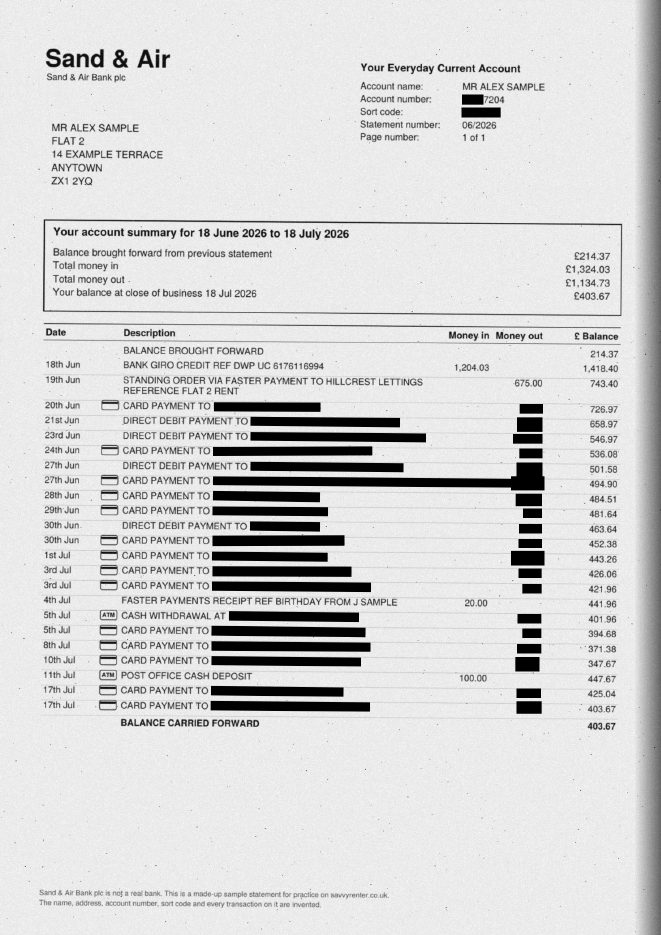
What it looks like: a made-up statement, before and after
Covered: the account number apart from its last four digits, the sort code, and who every unrelated payment went to and how much. Still readable: the name and address, the statement period, the rent payment with its date and amount, the money paid in, and the running balance on every line — so the other side can see nothing has been taken out of the middle.
Before — as it arrives from the bankAfter — saved from this page
Is it permanent? Yes. When you save, the page is turned into a flat picture with the black boxes painted into it, and that picture is put into a brand-new PDF. There is no text layer under the boxes to copy, search or lift off, and none of the original file’s hidden details, such as who made it and with what software, come with it. To check for yourself, open the saved file and try to select or search for any word: nothing will highlight.
Check it independently. Don’t take this site’s word for it. The “Check what’s still readable” button reads the finished page here, but you can get a second opinion from a tool you already trust. The text recognition built into your own device keeps the file on it: Live Text on an iPhone or Mac, Google Lens on Android, or Text actions in the Windows Snipping Tool. Well-known online converters, such as Adobe Acrobat’s free PDF tools, will also pull out any text they can find — but that means uploading the file, so use a service you trust. Whatever you use, what it can read is what the other side can read.
Savvy Renter — savvyrenter.co.uk · free tools for renters ·
This page runs entirely in your browser. No file you open here is uploaded, stored or sent anywhere.
What to leave on show
A rough guide for a rent dispute. The point of handing over a statement is to prove you paid.
Cover too much and it proves nothing; cover too little and you have handed over your whole life. This is what
has worked, not a rule of law.
It depends on what is in dispute
There is no fixed list, and this is the part that matters most. Work out what the other side is likely to say,
then leave showing whatever answers it — even where you would rather cover it.
You say you paid. Leave every payment out to them, in full, with the date and the amount.
They say they paid you back. Leave every credit into the account for that period, with the name
of whoever sent it showing. Cover the sources and they can point at any deposit and say “that was us”.
With the sources on show it is plain on the face of the statement that none of them was.
They say you underpaid in a particular month. Leave that whole month, both columns, not only the one
line you are relying on. A single line lifted out of a covered page invites the question of what is around it.
They rely on a document of their own. Leave whatever of yours meets it head on, in the same period.
So tailor it to your own case. The same figure can help you on one issue and hurt you on another, and only you
know what is being argued about — the decision is yours, and this page is a guide, not a ruling.
Leave it showing
Every rent payment — the date, the amount, and who it went to. That is the evidence. Never cover it.
The running balance column. A balance that runs unbroken down the page shows nothing has been taken out of the middle.
Your name and address at the top. Your landlord or agent already has both, so there is nothing to protect, and they tie the account to you.
The last four digits of the account number, the bank’s name, the statement period and the page numbers (“page 4 of 37”). The last four are how the account is identified in evidence without giving the number away.
Cover it
The rest of the account number, and the sort code.
Everything you spent that has nothing to do with the dispute — the payee and the amount. An intact column of figures can be read out in a hearing and turned into a story about you.
Other people’s names, references and account details, including anyone who pays money in.
Card numbers, telephone numbers, and anything that identifies a third party.
Never do this
Do not crop or delete rows. Cover them. A statement with lines removed looks edited, and the balance will not add up.
Do not use a highlighter, a shape in Word, or a black box you can drag off. Only a mark burned into the picture is a redaction. That is what this page does.
Do not hand over your only copy. Keep the original, unredacted, somewhere safe — the court can order it.
Hidden details in the file
A PDF carries more than you can see. A black box drawn in Word or a PDF editor often leaves the text
underneath in place, so anyone can copy it out or search for it. The file can also hold details such as
who made it and with what software. This page saves a new picture of each page with the marks painted in,
so the text under the marks and the original file’s hidden details do not come with it.
Doing it without a computer
Photocopy the statement and work on the copy, never the original. Cover each line with thick black tape or
a heavy black marker, then photocopy or scan that copy again, so the marks become part of the picture.
Hold the finished page up to a light: if you can read anything through the black, cover it again.
Before you send it
Open the saved file and read it as if you were the other side. Then ask the court, or the other side’s solicitor,
whether what you have sent is acceptable — it is far better to be told now than at a hearing. If you cover
something the other side says they need, they can ask the court to order an unredacted copy, and the court decides.
We are not lawyers and this is not legal advice. It is one renter’s experience of preparing
documents for a county court claim, written down in case it helps. Rules differ between courts and between kinds of case.
If anything turns on it, get advice — Shelter, Citizens Advice and your local Law Centre are free.